
Service Bindings
About Service Bindings
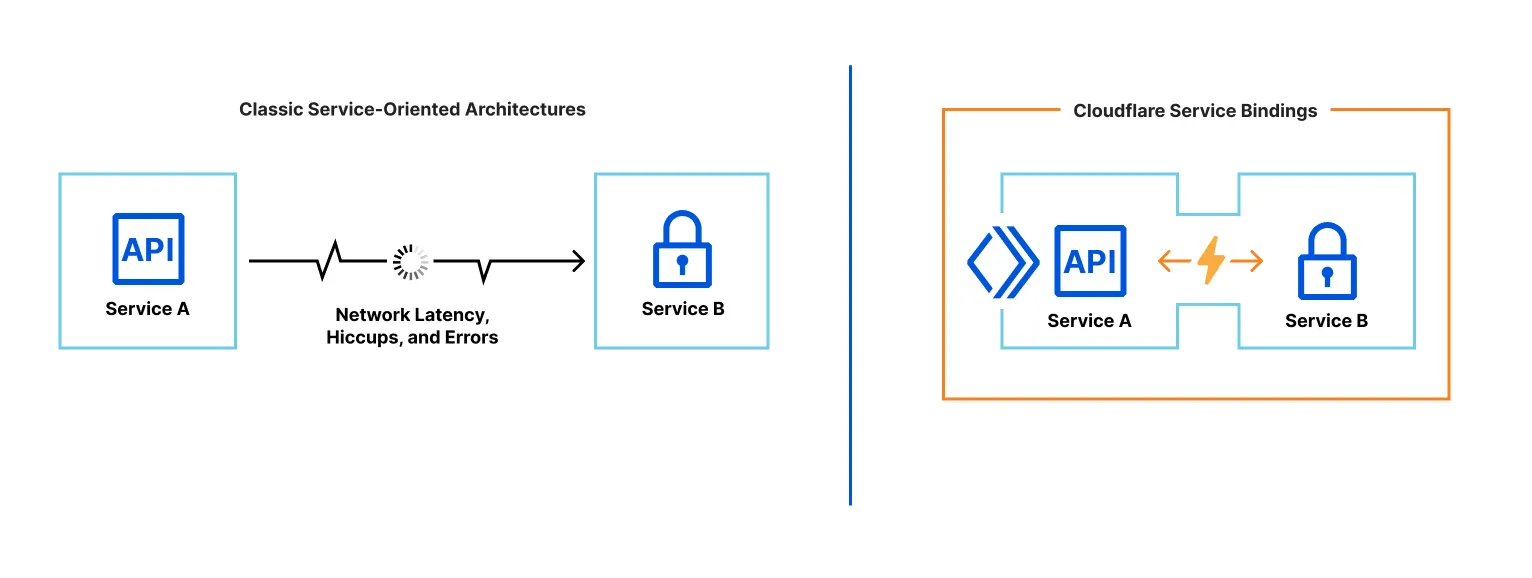
Service Bindings let one Worker call another without exposing a public URL. Worker A can invoke methods on Worker B or forward requests to it directly.
They give you microservice-style separation without extra latency, complex setup, or learning a new RPC protocol.
- Fast by default. There’s no extra hop or latency. Both Workers typically run on the same Cloudflare server and even the same thread. With Smart Placement, each Worker runs where it performs best.
- More than HTTP. Worker A can expose methods that Worker B calls directly—just write JS methods/classes.
- No added cost. Break features into multiple Workers without extra charges. See pricing.
Typical uses:
- Shared internal services. e.g., an auth Worker reused by many other Workers via a binding.
- Isolation from the public internet. Deploy a Worker that’s unreachable publicly and only callable through declared bindings.
- Independent deployments. Team A ships their Worker on their schedule; Team B ships theirs independently.
Configuration
Add the binding in the caller’s Wrangler config. If Worker A should call Worker B, add to Worker A:
wrangler.jsonc
{
  "$schema": "./node_modules/wrangler/config-schema.json",
  "services": [
    {
      "binding": "<BINDING_NAME>",
      "service": "<WORKER_NAME>"
    }
  ]
}
wrangler.toml
services = [
  { binding = "<BINDING_NAME>", service = "<WORKER_NAME>" }
]
binding: the key exposed onenv.service: the target Worker name (must exist in your account).
Interfaces
With a binding to Worker B, Worker A can call B in two ways:
- RPC — call your defined functions:
await env.BINDING_NAME.myMethod(arg1). Great for most cases and creating internal APIs. - HTTP — call B’s
fetch()handler with aRequest, receive aResponse:env.BINDING_NAME.fetch(request).
Example — first RPC binding
Extend WorkerEntrypoint for RPC. Create the callee Worker (“Worker B”) exposing add(a, b):
wrangler.jsonc
{
  "$schema": "./node_modules/wrangler/config-schema.json",
  "name": "worker_b",
  "main": "./src/workerB.js"
}
wrangler.toml
name = "worker_b"
main = "./src/workerB.js"
import { WorkerEntrypoint } from "cloudflare:workers";

export default class WorkerB extends WorkerEntrypoint {
  // No unnamed handlers supported yet
  async fetch() { return new Response(null, {status: 404}); }

  async add(a, b) { return a + b; }
}
Now create the caller (“Worker A”) and declare the binding to Worker B:
wrangler.jsonc
{
  "$schema": "./node_modules/wrangler/config-schema.json",
  "name": "worker_a",
  "main": "./src/workerA.js",
  "services": [
    {
      "binding": "WORKER_B",
      "service": "worker_b"
    }
  ]
}
wrangler.toml
name = "worker_a"
main = "./src/workerA.js"
services = [
  { binding = "WORKER_B", service = "worker_b" }
]
export default {
  async fetch(request, env) {
    const result = await env.WORKER_B.add(1, 2);
    return new Response(result);
  }
}
For local dev, run two Wrangler sessions—one per Worker—using npx wrangler@latest dev.
Each Worker deploys separately.
Lifecycle
The API is async—you must await calls. If Worker A calls Worker B and doesn’t await, B can be terminated early. See RPC lifecycle for details.
Local development
Run wrangler dev per Worker. Bindings show as connected/not connected depending on whether Wrangler can find the other Worker’s dev session:
$ wrangler dev
...
Your worker has access to the following bindings:
- Services:
  - SOME_OTHER_WORKER: some-other-worker [connected]
  - ANOTHER_WORKER: another-worker [not connected]
Wrangler can also run multiple Workers in one command with multiple -c flags: wrangler dev -c wrangler.json -c ../other-worker/wrangler.json. The first config is the primary Worker (served at http://localhost:8787); others are secondary and only reachable via bindings.
Experimental: Multi-config wrangler dev is experimental and may change. If you hit issues, please open one in the workers-sdk repo.
Deployment
Workers that use Service Bindings deploy independently.
On first deploy, the target Worker (B) must exist before the caller (A). Otherwise A’s deploy fails because its binding points to a missing Worker.
For updates, generally:
- Deploy changes to Worker B first in a backward-compatible way (e.g., add a new method).
- Then deploy Worker A (e.g., start calling the new method).
- Finally remove unused code (e.g., delete old methods from B).
Smart Placement
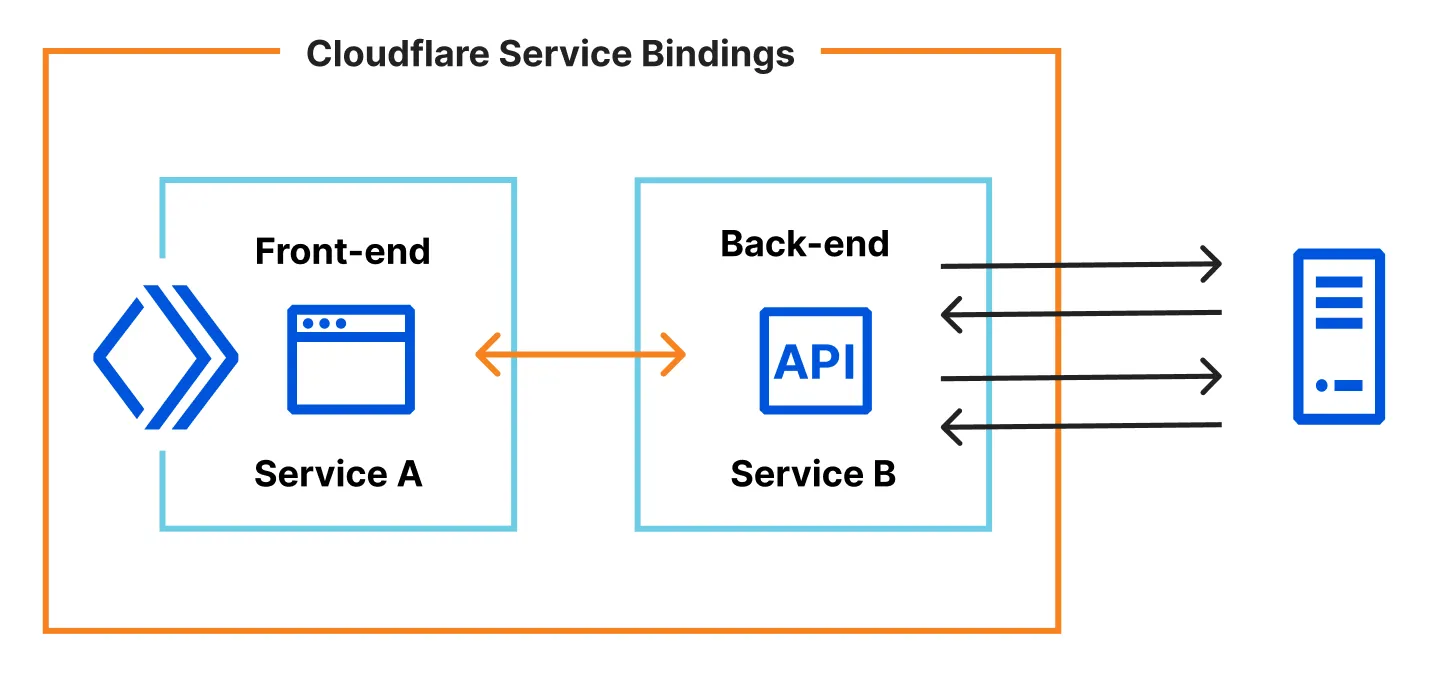
Smart Placement automatically runs your Worker where latency is lowest. Combine it with Service Bindings by splitting front-end/back-end Workers:
See the best practices.
Limits
- Each binding call counts toward the subrequest limit.
- Up to 32 Worker calls per request; extra calls throw.
- Binding calls do not count toward simultaneous open connections.
Summary
Service Bindings let Workers communicate efficiently without public URLs—great for microservices, shared internals, and isolation—while staying fast and inexpensive.
Key takeaways
- Zero-cost abstraction: no extra latency or cost
- Two call styles: RPC and HTTP
- Separation of concerns: split logic into dedicated Workers
- Independent deploys: teams ship their own Workers
- Local dev support: full dev + debug support
Where to use
- Microservice architectures
- Shared internal services (e.g., auth)
- Keeping services off the public internet
- Independent team deployments
- With Smart Placement for latency-sensitive backends
Best practices
- Prefer RPC for type-safe function calls
- Split front-end and back-end Workers
- Enable Smart Placement on back-end Workers
- Deploy in order (target first)
- Always
awaitasync calls
Notes
- Async API—remember
await - Max 32 Worker calls per request
- Local dev: run separate
wrangler devper Worker (or multi-config) - Deploy target Workers before callers